no data


Search All
no data
Enjoy a smarter and more convenient way to manage your group insurance policies — making every process easier and more secure, exclusively for valued customers like you.

Policy Information
Conveniently view detailed information about your group insurance policy for you and your family, including the main policy, supplementary benefits (riders), and coverage details for your family members.
Electronic Group Insurance Card
By just showing the photo of Electronic Group Insurance Card, the customer can use the services from Krungthai-AXA Life Insurance’s hospital partners nationwide. It is convenient, unnecessary to carry hard card, and worry-free of loss.
Track your claims and remaining
benefits with ease
Access your claim history and view your remaining OPD coverage — anytime, anywhere.
Submit Your Claims Online
Make claims “easy” with the Online Claim service
File a claim anytime, anywhere, right at your fingertips.
- เคลมได้ทุกที่ ทุกเวลา เพียงปลายนิ้ว
- ไม่ต้องส่งเอกสารตัวจริง (ภายในวงเงินใบเสร็จไม่เกิน 5,000 บาท/ครั้ง) ตามเงื่อนไขกรมธรรม์
- รองรับการเรียกร้องสินไหมแบบ OPD เช่น Dental, Health Check, Vaccine, Optical และกรณี Emergency Room (ที่เป็น OPD)
Check of Network of Hospital
Partners
Easily find healthcare providers within the
Krungthai-AXA Life Insurance network.
Registration steps to use Emma by AXA
Create an account to use Emma by AXA.
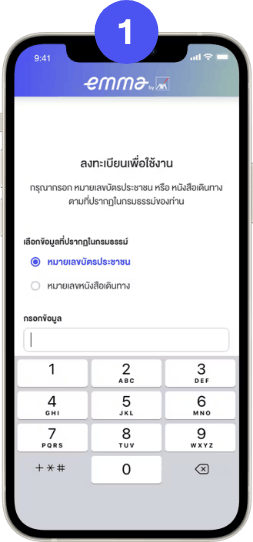
1. Submit Request
Enter Thai Citizen ID
or Passport ID
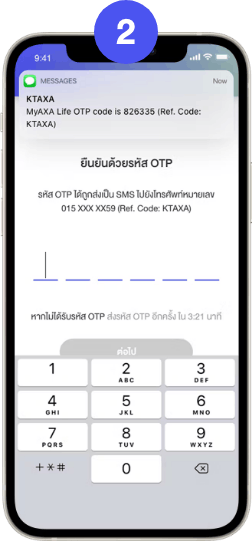
2. Confirm registration
Confirm registration
with the OTP Code
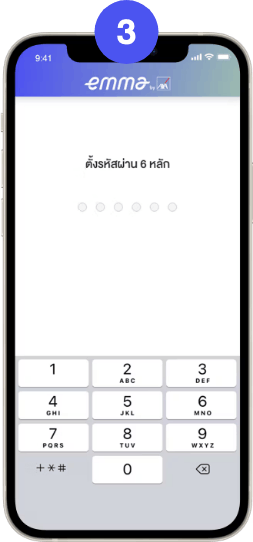
3. Set Password
Set 6 digits PIN code
and confirm
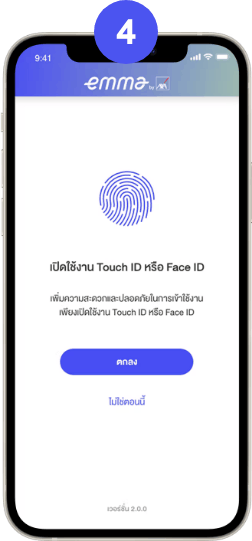
4. Enable Touch ID or Face ID
Activate Touch ID
or Face ID
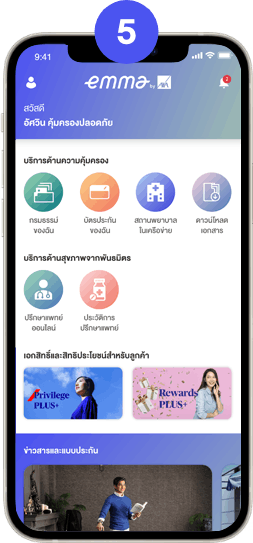
5. Registration Complete
Complete registration and
welcome to Emma by AXA
(รวมถึงกรณีทันตกรรม, ตรวจสุขภาพ, วัคซีน และสายตา ตามเงื่อนไขที่ระบุในกรมธรรม์)
สำหรับลูกค้าประกันกลุ่ม ที่มีผลประโยชน์ความคุ้มครองกรณีรักษาผู้ป่วยนอก (รวมถึงกรณีทันตกรรม, ตรวจสุขภาพ, วัคซีน และสายตา ตามเงื่อนไขที่ระบุในกรมธรรม์) เมื่อคุณสำรองจ่ายเงินค่ารักษาพยาบาลยอดตามใบเสร็จไม่เกิน 5,000 บาท คุณสามารถยื่นเคลมผ่านออนไลน์ ได้ด้วยตัวเอง “ง่ายๆ“
1. เตรียม 4 เอกสาร ดังนี้
1) หน้าสมุดบัญชีธนาคารผู้เอาประกัน
2) ใบเสร็จรับเงิน
3) ใบรายละเอียดค่าใช้จ่าย* *กรณีจำนวนเงินในการเรียกร้องค่าสินไหมทดแทนมียอดเกิน 3,000 บาทระบบจะแสดงหัวข้อ “ให้แนบใบรายละเอียดค่าใช้จ่าย” สำหรับขอเอกสารเพิ่มเติม
4) ใบรับรองแพทย์
2. ส่งผ่านแอปพลิเคชัน Emma by AXA ด้วย 5 ขั้นตอน ดังนี้
1) เลือกกรมธรรม์ประกันกลุ่มที่ต้องการเคลม
2) คลิกที่ไอคอนส่งคำขอเรียกร้องสินไหม
3) เลือก “การเรียกร้องสินไหมผู้ป่วยนอก / OPD”
4) ระบุรายละเอียด และแนบเอกสาร
5) กดส่งคำขอ
และคุณสามารถตรวจสอบสถานะ และประวัติการเคลมได้ตลอดเวลา
เมื่อทางบริษัทฯ ทำการอนุมัติเงินค่าสินไหม เงินจะถูกโอนเข้าบัญชีธนาคารของท่าน ภายใน 5-7 วันทำการ
หมายเหตุ
- ก่อนส่งเอกสาร โปรดระบุข้อความ “ใช้สำหรับการเบิกค่ารักษาพยาบาลกับ บริษัท กรุงไทย-แอกซ่า ประกันชีวิต เท่านั้น” บนใบเสร็จรับเงินต้นฉบับ เพื่อความรวดเร็วในการพิจารณา
- กรุณาเก็บเอกสารยื่นเบิกดังกล่าวอย่างน้อย 90 วัน เนื่องจากอาจมีการขอเอกสารต้นฉบับเพื่อประกอบการพิจารณาภายหลัง
- กรุณาตรวจสอบรายละเอียดในเอกสารทุกแผ่นให้มีความชัดเจน และครอบคลุมรายละเอียดการรักษาครบถ้วน ทั้งนี้หากมีข้อมูลไม่ชัดเจน หรือต้องพิจารณาความจำเป็นทางการแพทย์ในการเข้ารับการรักษาพยาบาล ทางสินไหมสุขภาพจะดำเนินการขอเอกสารเพิ่มเติม เพื่อประกอบการพิจารณา
- หากใบเสร็จรับเงินค่ารักษาพยาบาลเกิน 5,000 บาท รบกวนลูกค้าโปรดเตรียมเอกสารที่ใช้ในการเคลมให้ครบถ้วน และส่งมายังบริษัทฯ การเรียกร้องค่าสินไหมทดแทน


The “Emma by AXA” Application is a digital
assistant that enhances convenience and speed in accessing a variety of health services and policy information, all within a single platform.
Please note that the policy status must be active as of the service date.
Customers can download and register to use the app immediately.
Customers can download and register for use on mobile phones supporting iOS and Android operating systems.
- iOS Version 15 and above;
- Android Version 9 and above
It is recommended to always update the application to the latest version.
For more information or experiencing issues with the “Emma by AXA” application, please contact Customer Care Center at 1159 or email customer.care@krungthai-axa.co.th
Yes. If your policy includes family coverage, you can easily view coverage details, remaining benefits, and claim history for your family members — all in one place, for complete peace of mind.
Yes. Just log in to Emma by AXA and show your digital group insurance card (E-Card) at a network provider. No physical card is needed - you can access treatment right away.
You can easily search for network healthcare providers through the “Network Providers” menu on the application. The system will display a list of nearby hospitals and clinics, along with maps and contact details, making it convenient for you to access treatment without the need for advance payment*.
*Subject to policy terms and conditions.

 ดาวน์โหลดโบรชัวร์