no data


Search All
no data
Renewal Premium Payment and Apply for Automatic Premium Deductions on Emma by AXA Application
Emma by AXA Application recommends various payment channels. customers can make payment transaction easily by yourself. Anywhere, anytime – The excellent service for the valued customers of Krungthai-AXA Life Insurance.

By online credit card
By online credit card on the “Emma by AXA” Application

By mobile banking
By mobile banking application with QR Code

Automatic premium deductions
Apply for automatic premium deductions via credit card to ensure that insurance premiums are not missed.
1.1 Select “My Policy”, then select the desired policy.
1.2 Click the “Payment Details” button at the bottom of the policy details page.
1.3 Renewal premiums payment via online credit card. Customer can be made in full or in installments. (Please see the terms and conditions, installment payment details from card issuer.)
1.4 Click to accept the payment terms, enter your credit card details, and confirm with the OTP.
1.5 After successful payment and the Company has recorded the transaction into the system, customers will receive a receipt within 4 working days via email or SMS.
1. Visa, Master and JCB credit cards are accepted.
2. You can pay premiums on the policy page you choose. The system will display the premium payment menu 28 days before the payment due date.
3. Premium payments for the following products are not available: Life Easy 10/4, Life Save 10/2, iInvest, Life Smart 10/4, MRTA, GLTSP, Life Save Plus 15/5, and Smart Saver 15/5 (this list may be updated or changed later).
4. Customers of the Investment Linked Product (ILP) who pay premiums with a Citibank credit card, and whose credit card numbers begin with the following first six digits: 5434-49, 5265-32, 5271-73, 5434-49, 5267-44, 5224-40, or 5404-32, cannot make premium payments. (Additional or changed credit card numbers and/or card-issuing banks may apply beyond those listed above.)
2.1 Select “My Policy”, then select the desired policy.
2.2 Click the “Payment Details” button at the bottom of the policy details page.
2.3 Select “Generate QR Code” and click “Save Image”.
2.4 Scan QR code image to make a payment via mobile banking application.
2.5 After successful payment and the Company has recorded the transaction into the system, customers will receive a receipt within 4 working days via email or SMS.
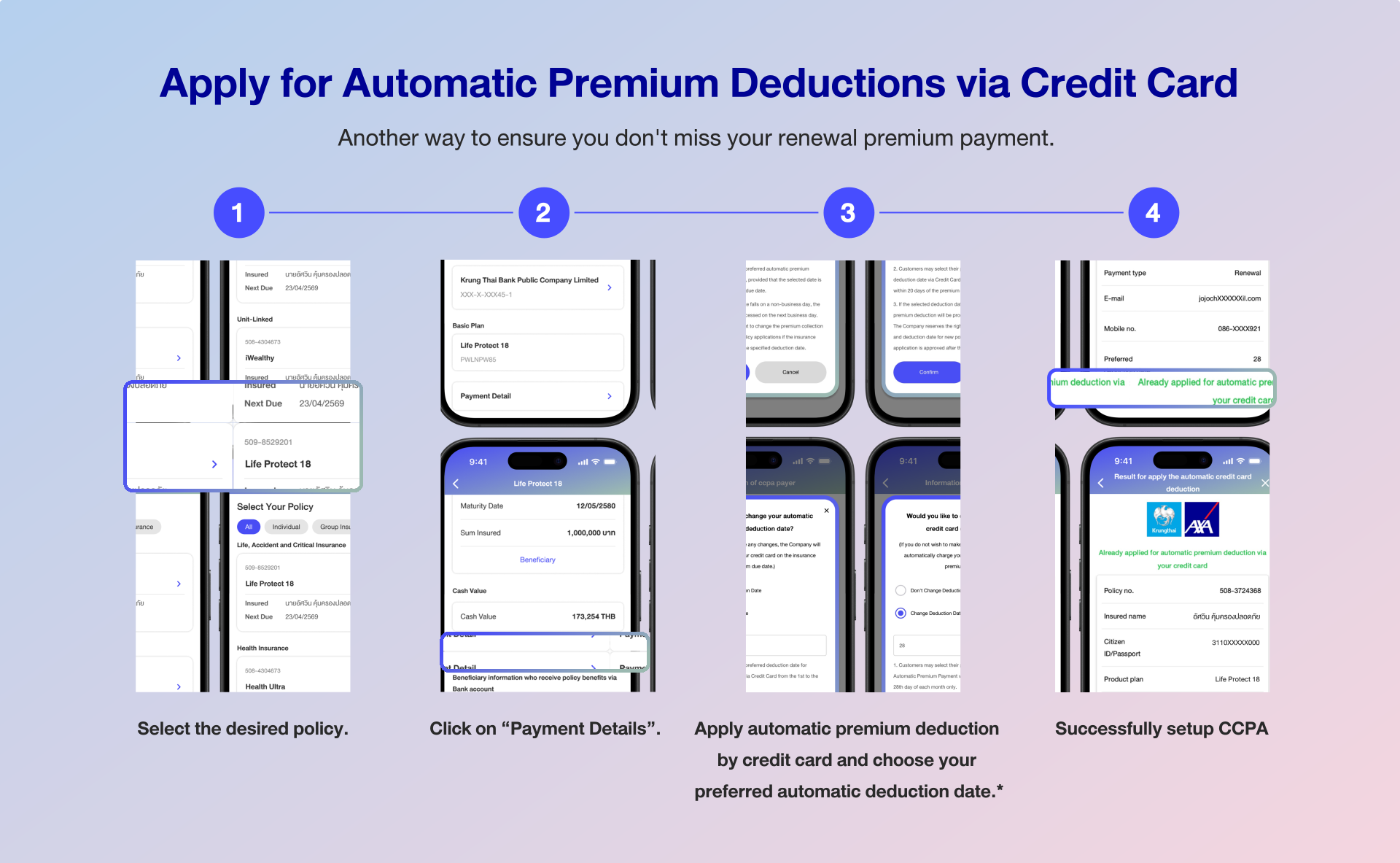
Another convenient way to ensure you never miss a premium payment for the upcoming year is by setting up automatic premium deduction. Paying your premiums on time helps keep your coverage active without interruption, giving you peace of mind. You can do this easily yourself, anytime, anywhere.
1.1 Select the desired policy.
1.2 Select “Payment Details”
1.3 Select “Apply automatic premium deduction by credit card”
1.4 Choose your preferred automatic deduction date,
from the 1st to the 28th of the month only.*
1. To apply for services or update credit card information, please complete the process at least 7 days before the premium payment due date.
2. The following insurance plans do not accept credit card payments: Life Easy 10/4, Life Save 10/2, iInvest, Life Smart 10/4, MRTA, GLTSP, Life Save Plus 15/5, and Smart Saver 15/5 (this list may be updated or changed later).
3. For iWealthy and iLink products, if paying premiums monthly, customers must apply for the automatic premium deduction service via bank account or credit card (DA/CCPA) for the next premium installment.
4. For investment-linked life insurance (ILP) Customers of the Investment Linked Product (ILP) who pay premiums with a Citibank credit card, and whose credit card numbers begin with the following first six digits: 5434-49, 5265-32, 5271-73, 5434-49, 5267-44, 5224-40, or 5404-32, cannot make premium payments. (Additional or changed credit card numbers and/or card-issuing banks may apply beyond those listed above).
5. Customers may select their preferred deduction date for automatic premium payment via Credit Card from the 1st to the 28th day of each month only.
6. Customers may select their preferred automatic premium payment via credit card, provided that the selected date is within 20 days of the premium due date.
7. If the selected deduction date fails on non-business day, the premium deduction will be processed on the next business day. The Company reserves the right to change the premium collection and deduction date for new policy applications if the insurance application is approved after the specified deduction date.
2.1 Select the desired policy.
2.2 Select “Payment Details”
2.3 Select “Apply automatic premium deduction by Saving account of Krungthai Bank”



Someone who is not the insured can make a payment on behalf of the insured, but documentation must be submitted each time to prove the relationship between the payer and the insured.
It is subject to the terms and conditions of the credit card-issuing bank, in accordance with the requirements of the Securities and Exchange Commission.
No, only Visa, Master and JCB credit cards are accepted.
No, it cannot be used for payments in installments; only full payments can be made via automatic credit card deduction.