no data


Search All
no data
Online Claim Service via Emma by AXA Application
Emma by AXA introduces the Online Claim Service, designed to make the process of claim a simpler and more convenient experience for you. With this service, your claim experience will be easier than ever before. It caters to your online lifestyle, allowing you to manage your claims effortlessly with just a few taps of your fingertips.
For individual policy customers and group insurance customers who have Outpatient Department (OPD) benefit, if you have made an advance payment for medical treatment expenses that is not exceed 5,000 Baht, you can easily submit an OPD Claim on your own.
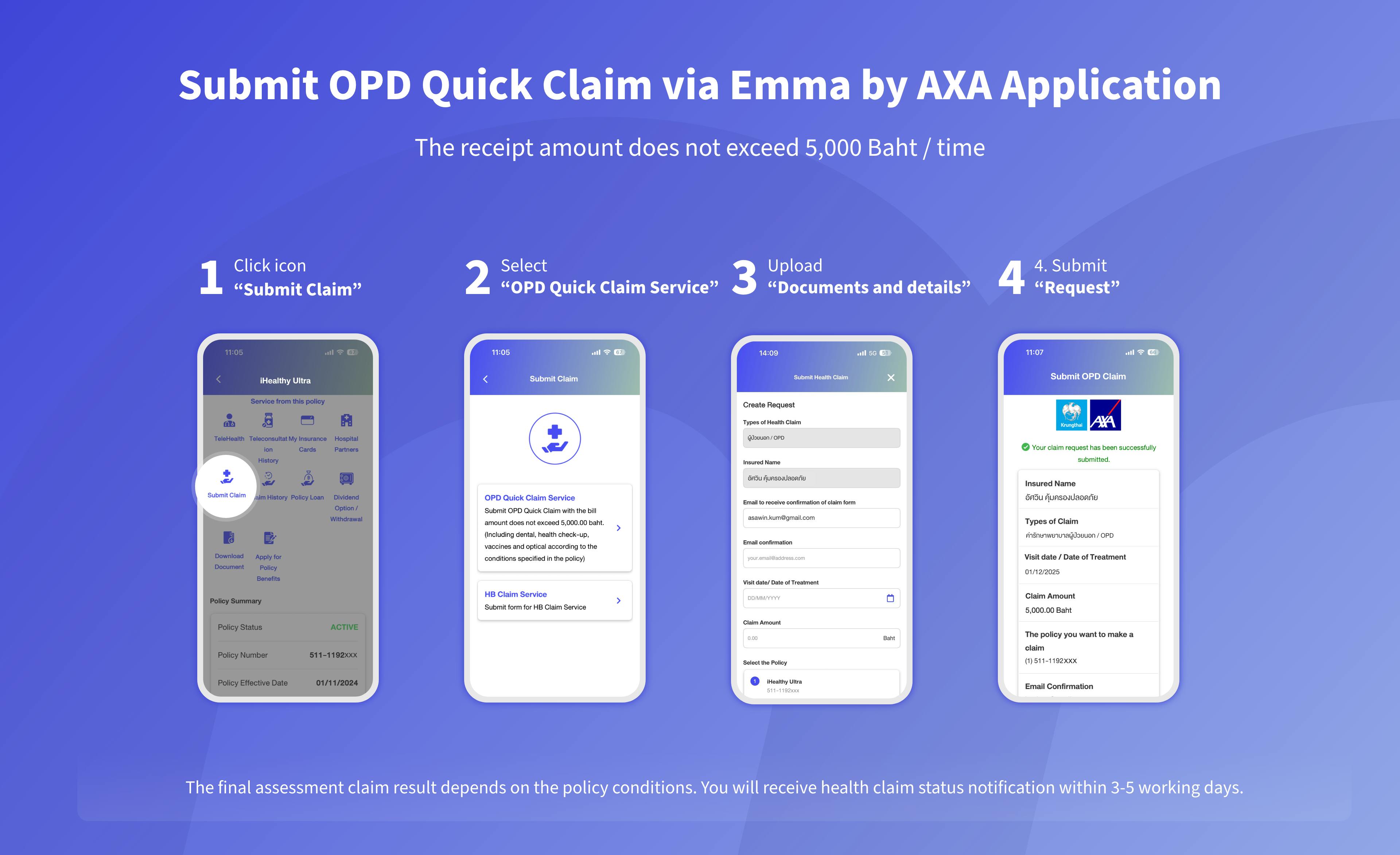

For individual policy customers and group insurance customers who have Outpatient Department (OPD) benefit, if you have made an advance payment for medical treatment expenses that is not exceed 5,000 Baht, you can easily submit an OPD Claim on your own.
1) First page of the bank book (the insured)
2) Receipt
3) Expense Details
4) Attending physician statement
1) Select the policy required for claim
2) Click icon “Submit Claim”
3) Select “OPD Quick Claim Service”
4) Specify the details and upload documents.
5) Press “Submit Request”
Moreover, you can easily check the claim status and claim history at any time.
The claim amount will be promptly transferred to your given bank account within 5-7 business days after claim settlement.
- This service is eligible for Outpatient Department (OPD) treatment for individual customer and group insurance customers does not apply for personal accident policy. If the conditions are not met, please submit the documents to the Company for further process.
- Before submitting your documents, please ensure that you have specify the statement "use for health claim reimbursement at Krungthai-AXA Life Insurance PCL only" on the original receipt this is to shorten the assessment process.
- Please ensure that you keep the documents for at least 90 (ninety) days due to the possible consequent request of the original documents for consideration support.
- Please check the details of all documents to be clear and cover complete treatment details. However, if there is unclear information or must consider medically necessary, Health Claims Department will request additional documents for consideration.
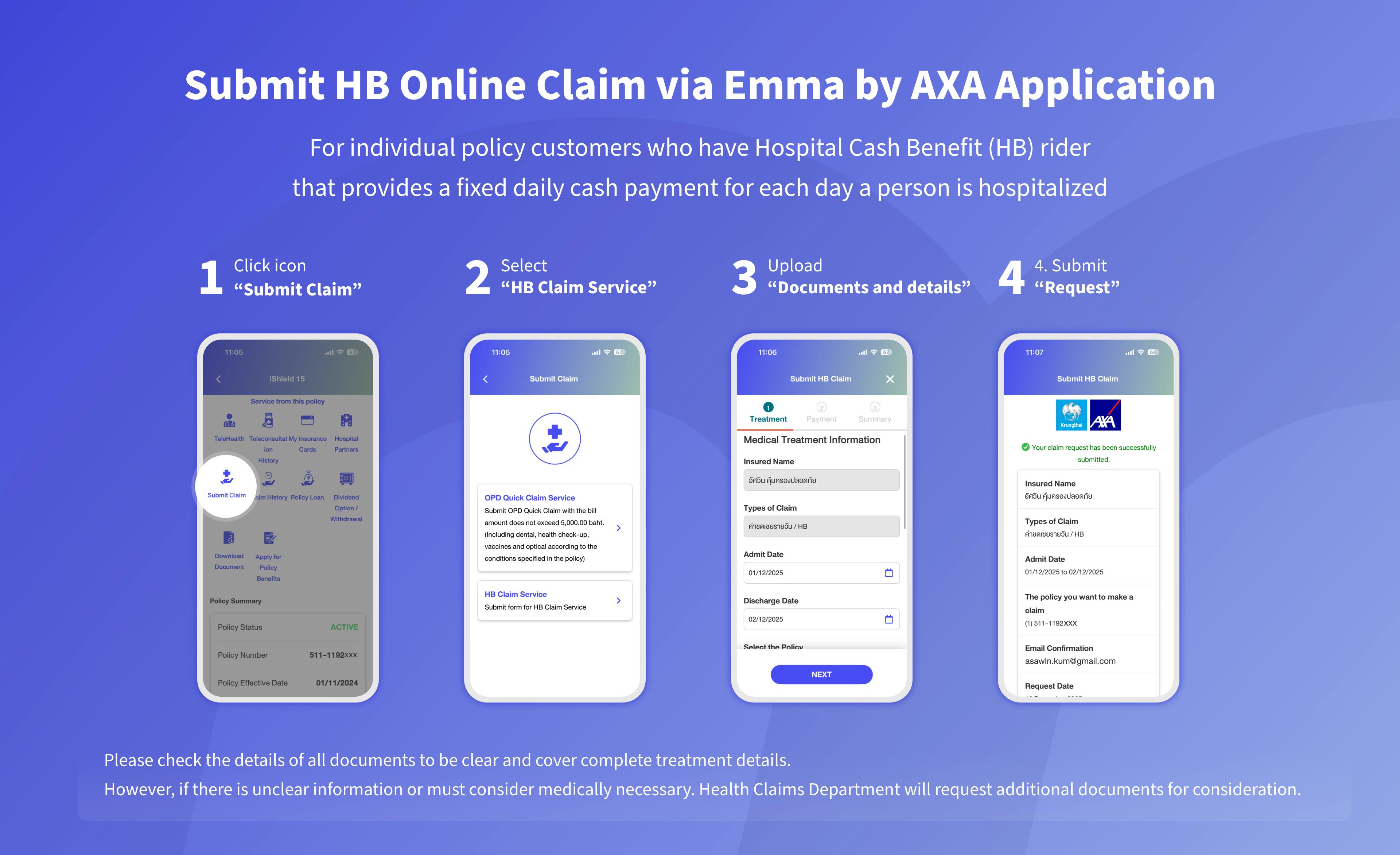

For individual policy customers who have Hospital Cash Benefit (HB) rider that provides a fixed daily cash payment for each day a person is hospitalized.
1) First page of the bank book (the insured)
2) Medical Certificate or IPD Claim Form
1) Select the policy required for claim
2) Click icon “Submit Claim”
3) Select “HB Claim Service”
4) Specify the details and upload documents.
5) Press “Submit Request”.
Moreover, you can easily check the claim status and claim history at any time.
The claim amount will be promptly transferred to your given bank account within 5-7 business days after claim settlement.
Please check the details of all documents to be clear and cover complete treatment details. However, if there is unclear information or must consider medically necessary. Health Claims Department will request additional documents. for consideration.
“Online Claim Service” which is a service for health claims via the Emma by AXA application to help make claim disbursement more convenient and faster.
The claim status can be checked at any time and when the claim is approved money will be transferred to your bank account within 5-7 business days
Customers can easily submit claims online by themselves. Just prepare the documents and submit documents online through the Emma by AXA application.
The customer who has effective individual health policy and group insurance* of Krungthai-AXA Life Insurance PCL
who have health benefits coverage as follows
2.1 Individual policy customers as well as group insurance* customers made advance the payment of Outpatient Department (OPD)
* IPD treatment expenses, Personal Accident Policy, critical illnesses, and death claim, and Group, have not yet been supported.
2.2 Customers who have Hospital Cash Benefit (HB) rider that provides a fixed daily cash payment for each day a person is hospitalized.
The Accident insurance customer cannot use Online Claim Service via Emma by AXA. Please submit the completed documents to the Company. For additional detail, click https://www.krungthai-axa.co.th/th/customer-service/claims-procedure/output-patient-department.
1.Medical Treatment Expenses is not exceeding 5,000 Baht.
2.Medical Treatment Expenses exceeds 5,000 Baht, Please submit the completed documents to the Company.
The final assessment claim result depends on the policy conditions. You will receive health claim status notification within 3-5 working days.
If the Company determines that the coverage for Outpatient Department (OPD) treatment falls within the Day case conditions, the hospital cash benefit shall apply regarding to policy coverage the original documents are not required on this process.
You can claim daily compensation (HB) when you are admitted as an inpatient (IPD) or Inpatients who do not need to be hospitalized (Day Case) due to illness or accident with a duration of more than 6 hours and has an Admission Number.