no data


Search All
no data
Emma by AXA Application is designed to deliver the best experience, providing convenience and speed so you can easily manage your policy information, various services that cover all your needs, and your exclusive benefits. It is available for Krungthai-AXA Life individual life insurance customers as well as group insurance customers.


The “Emma by AXA” Application is a digital assistant that enhances convenience and speed in accessing a variety of health services and policy information, all within a single platform.
Krungthai-AXA Life Insurance customers
1.1 Individual policies, including MRTA Insurance
1.2 Group insurance policies and coverage for your family
Please note that the policy status must be active as of the service date.
Customers can download and register to use the app immediately.
Customers can download and register for use on mobile phones supporting iOS and Android operating systems.
- iOS Version 15 and above;
- Android Version 9 and above
It is recommended to always update the application to the latest version.
For more information or experiencing issues with the “Emma by AXA” application, please contact Customer Care Center at 1159 or email customer.care@krungthai-axa.co.th
When a parent registers to use the application with their identification card number, the system displays the policy information for both the parent (as the insured) and the child (for whom the parent pays the premium).
Registration steps to use Emma by AXA
Create an account to use Emma by AXA.
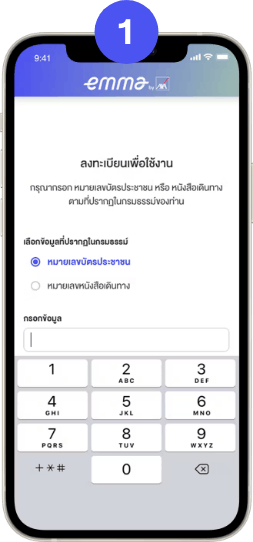
1. Submit Request
Enter Thai Citizen ID
or Passport ID
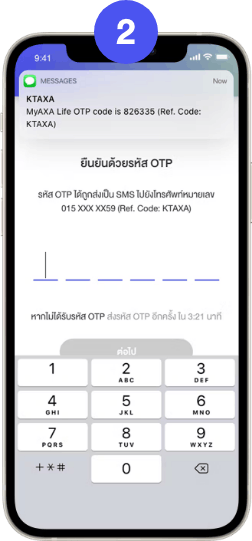
2. Confirm registration
Confirm registration
with the OTP Code
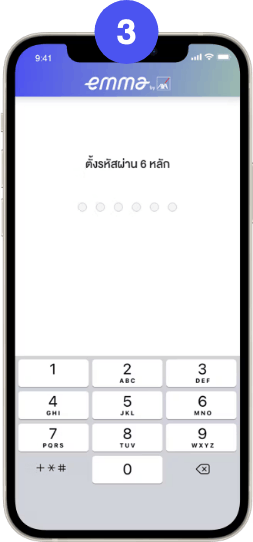
3. Set Password
Set 6 digits PIN code
and confirm
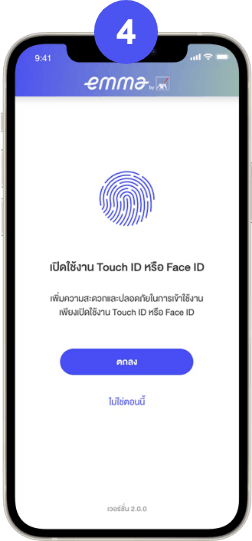
4. Enable Touch ID or Face ID
Activate Touch ID
or Face ID
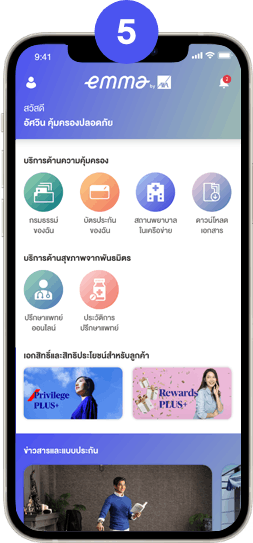
5. Registration Complete
Complete registration and
welcome to Emma by AXA